Introducing a new tool for Transport Partners
AnyVan’s FREE job management tool – giving you exclusive and priority access to jobs

What you get
What you get
With our new job management tool, you can manage everything in one place—both AnyVan jobs and private work! Say goodbye to pen and paper and take advantage of these powerful features for your own jobs:
✅ Full driver app usage
✅ Live driver tracking
✅ Digital job sheets
✅ Proof of delivery and collection
✅ On-the-job photo uploads
✅ More coming soon!
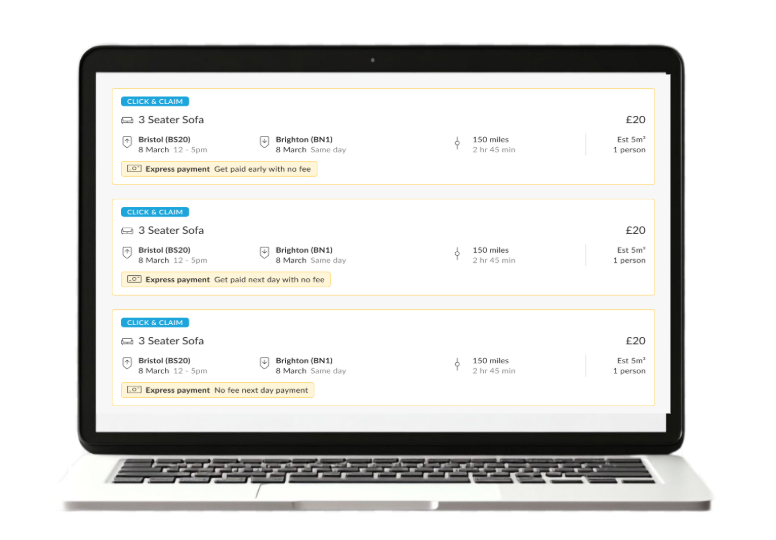
You’ll get exclusive job recommendations for your routes, plus we’ll keep searching for jobs that match!
How it works

How it works
It couldn’t be easier.
1. Add a route or job - all we need is where from and to, the date and vehicle (no personal details needed).
2. We’ll actively keep finding jobs that match your routes and notify you!
3. Simply assign a driver to your jobs to use the Driver App features.
4. Use the AnyVan Dashboard to manage all your work in one place.
And there's more - coming soon!

And there's more - coming soon!
We’re making our driver platform better for YOU! Over the next few months, we’ll be adding:
🗓️ Calendar
Manage both your own jobs and Anyvan jobs in one calendar view.
💷 Invoicing
invoice easily for your jobs.
📈 New business insights
Track your work and business growth in one place.
🚛 Smart Job Matching
Improved matching algorithms to make it easy for you!
Benefits to you
Benefits to you
Get matched with jobs on your routes
Maximize earnings without searching.
We’re always finding new jobs for you
Leave the hard work to us.
Manage everything in one too
No need to juggle paper and multiple apps.
Live driver tracking
Improve on the day operations.
Automated customer updates
Keep customers informed effortlessly.
Instant digital PODs & POCs
Secure proof of work and avoid disputes.
Paperless job sheets
Stay organized and eliminate manual admin.

Do I need to add details about my private job?
The most basic information we need in order to recommend jobs is your route (locations & date). Providing detailed job information will unlock Driver App functionality and enable us to give more accurate recommendations.
How do I add a private job route to the system?
You can add a private route by entering the pickup and drop-off locations, date, and vehicle details—no personal information is required.
Do I have to accept AnyVan jobs to use this feature?
No, you can use the system purely for managing your own private jobs, but you have the option to receive additional job recommendations.
How do I get job recommendations that match my routes?
Simply enter a job or a route, and we’ll automatically find jobs that align with your work.
Can I choose which AnyVan jobs I want to accept?
Yes, you’ll receive exclusive recommendations based on your routes, and you can choose which ones to take.
